
Second Brain Studio
What it does for you.
Everything Studio does, in the order you’ll use it — each shown on the real app, with a demo brain, and with its honest limit beside it.
Mac (Apple silicon and Intel), Windows and Linux · free · all downloads
See it
Put it to work
Get set up in minutes
Set up in a few clicks. No terminal.
Use the AI you already pay for. One guided setup installs it, signs you in and adds the brain builder and the agents — no terminal, nothing to install by hand.

- 1Choose your AIClaude Code (runs all the agents), Codex (builds and chats) or an API key.
- 2Install itOne click runs its maker’s official installer. No admin password.
- 3Sign inOn the vendor’s own page — Studio never sees your password.
- 4Install Second BrainThe brain builder and the agents, into the folders your AI reads.
- 5Browser extensionOnly for the agents’ browser steps — forms, flight search, social steps.
- 6Add your dataAdd yourself or your company, drop the exports, press Build.
- 7Talk to it & put it to workAsk anything; open Agents and start with “Set up my profile”.
Already use Claude Code or Codex?
Paste this and it installs the brain builder and the agents, asking before each step.
Install Second Brain Link on this computer by following https://secondbrainlink.com/install.md
Does Studio need a terminal? No. Setup runs the vendor’s own installer, opens its sign-in and installs everything else in one click. API-key users build without any command-line tool at all.
Does it update itself? Yes — the desktop app checks the public releases page and installs updates. Mac ships separate Apple-silicon and Intel builds; Windows x64; Linux AppImage and .deb.
Use the AI you already have.
Pick it in Settings › AI: Claude Code or Codex on the plan you already pay for, a model on this computer with Ollama or LM Studio, or a provider with your own key — Anthropic, OpenAI, Gemini, xAI, DeepSeek, Mistral, Groq, OpenRouter, Vertex AI, Azure AI Foundry or any OpenAI-compatible endpoint.
- A key stays on this device and goes straight to the provider.
- The local CLIs and local models need no key at all.
- Pick the model, and for Claude Code how long it thinks before acting.

See it
Know who you know.
Every export knows a slice of you. Studio draws them as one graph you can filter by kind of note or by export, and shows what your brain is made of — the kinds of notes, how many, and how they connect.
How the brain is built: your exports at the base, the kinds of notes in the middle, answers and agents on top.


One record per person, from every export.
LinkedIn, GitHub, Facebook and Instagram each keep their own list of people. Studio merges them into one note per person and marks it Resolved when two or more exports know them, matched by name — and the note lists every export it came from.
- LinkedIn437 people · 34 posts
- GitHub142 people · 10 repos
- Facebook138 friends · 40 check-ins
- Instagram127 followers · 21 posts
- One brain438 people · 329 Resolved, matched by name
name-onlyMatching is by name only — exact after normalising, so initials and variant spellings stay separate, and no AI decides a merge. Two different people with one name would share a note; when exports disagree about a field, the other value is kept as “Also reported”.
How does it know two records are one person? By name. Two exports agreeing on a name make one note; a wrong merge is worse than a miss, so better matching stays on the roadmap until it can be just as careful.
Ask it
Get answers you can check.
Ask in plain English. Brain recall starts from your question and follows the links in your brain to the notes that matter — then shows you which ones. The model answers from those notes and cites them; a chart is drawn only from numbers counted in your brain.
- 1 · You ask
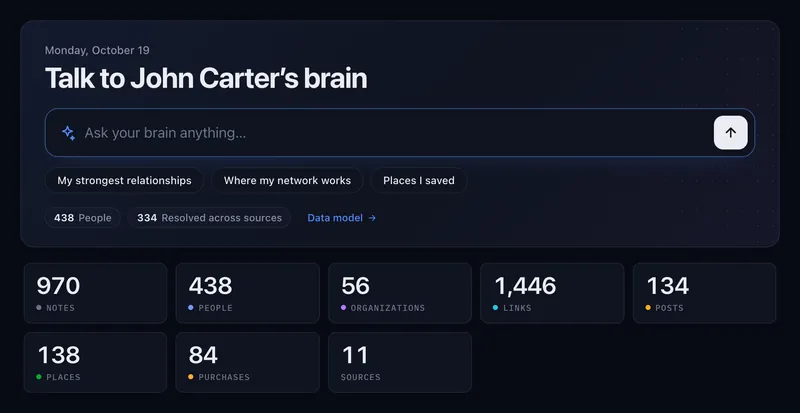
From the chat, or the Dashboard’s ask box with the questions this brain can answer.
- 2 · Brain recall reads
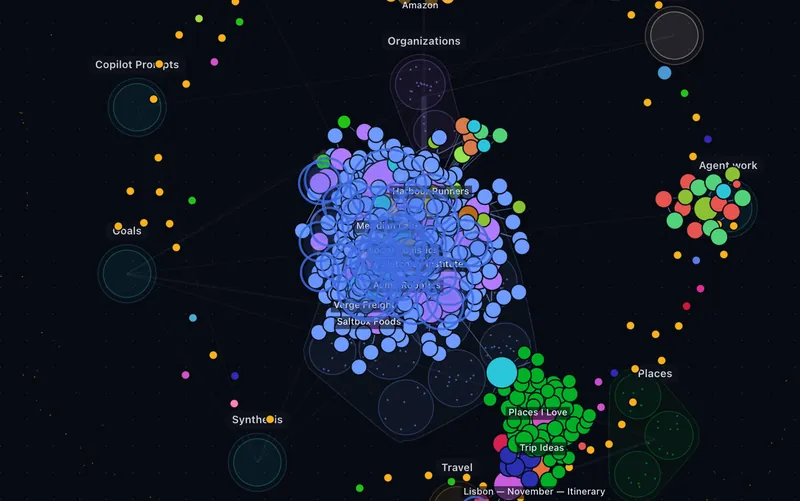
The notes it read light up on the graph — deterministic, on your machine, no model involved.
- 3 · It answers, with Receipts
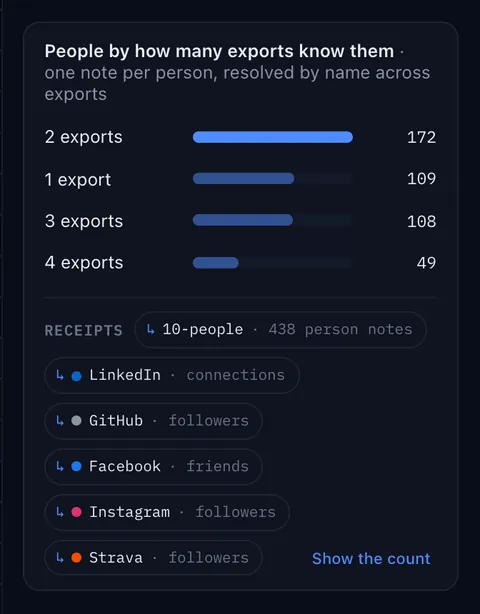
Under every chart: what was counted, from which folder and which exports. Show the count opens the numbers.


snapshotAn export is a snapshot: the brain is sharp on history and blind to this week until the next Update.
Won’t it make things up? It is told to answer only from the notes Brain recall found, and to cite each one — so every claim opens to its source. When the brain doesn’t have it, the answer should say so.
Which AI does it use? Yours: Claude Code or Codex, a model on your own computer (Ollama, LM Studio, any OpenAI-compatible server) or a provider with your own key. Calls go straight to the provider.

Brain › Avataron-device voice
Or just say it.
Say your question and a rigged 3D person answers out loud with a short spoken summary, while the full, cited answer lands in the chat. Talk over it to interrupt, or say “stop”. It is Ask mode — read-only: when something needs an agent to act, it offers to open that agent’s chat.
- Elenayour brain
- Marcusyour job hunt
- Luciayour trips
- Jamesyour raise
Does my voice leave the device? No. Hearing (Whisper) and voice (Kokoro) run inside Studio; they download once — about 530 MB with a graphics card, about 170 MB without — and are cached.
Where is the 3D person from? Open licences only: people made with MakeHuman (CC0), the TalkingHead engine (MIT), Kokoro and Whisper (Apache-2.0); a few CC-BY garments, credited in the app.
Put it to work
Hand off the busywork. Keep the decisions.
The Agents section runs a job on your brain: a chat grounded in one agent, the dated note it writes updating live beside the conversation, and every decision asked as real buttons. Each agent runs a daily toward a goal you set, and reads its own numbers once a week.

- Jobs Agentv1.7.0 · shippeda job hunt, every weekday — sweep, a CV per role, the form; counts interviews
- Fundraising Agentv0.4.0 · previewa raise, every weekday — new programs and investors, applications, an angle per fund; never sends
- Travel Agentv0.2.0 · developer previewyour city, every day — what is new to try near you, from your own places; and the trip, on the Map
- Sales Agentv0.2.0 · developer previewa pipeline, every weekday — leads from your brain first, a strategy per account, sent through a guard
- What each agent does
Decide in seconds, without rubber-stamping.
Before anything that can’t be undone, the agent stops with an approval: the actual document, every field and where it came from, in one sentence what happens if you approve, and what it will never do. Deny takes a reason, and the next run reads it.
Will it send, submit or book on its own? Not by default. Autonomy is a level you set per agent, and the default is supervised. The Fundraising Agent (v0.4.0, preview) never sends and the Travel Agent (v0.2.0, developer preview) books nothing, at any level. The Sales Agent (v0.2.0, developer preview) sends only from your own mailbox, through its send guard, and its first real send always asks.
Where do agents run? In the desktop app, or a browser Studio you run on your own computer, through your own Claude Code. The hosted browser Studio is a read-only demo.

Goals · Routines · Inbox · Activitydeveloper preview
Set a finish line. It keeps going.
Give an agent a goal with a finish line and turn on its daily. Studio runs it on schedule, stops to ask before anything that matters, writes down what it did — and pauses the routine once the goal is met. Every agent comes with its goal and its daily seeded, off, and a Daily tab in its settings: the time and days, what the daily does, the autonomy level, the goal, and whether its weekly review’s proposals are asked or applied.
An outcome with a finish line. Progress counts real results only — an interview you record, a finished trip plan — never busywork.


Every daily, the same loop
- Checks, then recallNot signed in, or the profile missing? It says so and doesn’t run. Otherwise it reads what it remembers and the last run’s report.
- Opens its dated note
Shortlist 2026-10-20,Sell today …— first, and kept current beside the chat as the day fills. - Discovers, screens, shortlistsYour brain first, then the sources that have produced, plus a share of new ones every run; knock-outs and your filters; the day’s ranked list.
- Acts behind the gatesAt the level you set, supervised by default; writes only to its own folder; “done” counts only with evidence — the ledger row, the file, the form.
- Logs, redraws, reflectsThe ledger, its line, the dashboard and the KPI note, rendered by a script; a few lessons, flagged as inferred.
- Hands off — and reviews weeklyDone · Not done yet · Next step · Needs you. Once a week it reads its own counts and proposes changes with the evidence; asked by default.

Off until you turn it on.
On the desktop, Studio can run routines while it is open or from the menu bar, through your own Claude Code sign-in, with a daily cap you set. Approvals can come to your phone through your own Telegram or Slack bot — outbound polling, no open port on your machine.
awake onlyA sleeping computer runs nothing, and a missed run says so in its report. Several dailies run side by side, across a personal and a company brain, under a cap you set on heavy runs — the rest wait for a slot and say so. There is no cloud scheduler; how a background run is billed depends on how your Claude Code is signed in.
Does it run while my computer sleeps? No. It runs while the computer is awake and Studio is open or in the menu bar — and every background option is off until you switch it on.
Runtime · Floor · Lines · Workerdeveloper preview
Watch your agents work.
One place, seen from three distances: the hall, a production line, one run. A glance tells you who is working, what they’re doing in plain words, and when one needs your answer.
Every agent is a production line, and every run a worker standing at the station it is working on. Helpers stand beside it; a status line counts the day.


watches onlyRuntime watches; it does not schedule — routines stay in Goals & Routines. Stop, Open chat and Answer in chat are your clicks, and Stop asks once. It shows the runs on this computer (the hosted demo has no agents installed, so it has none), in the desktop app.
Does Runtime send anything to the cloud? No. It is a view over the Studio sessions already on your machine. The browser’s screenshots stay in the app session and are never written into your chats.
Why does it say “likely”? A worker is tied to an item only with evidence, and the label says how strong it is: certain when it wrote that item’s note, pointed when the agent named it, likely when the item’s name turned up in its steps.
Memory
Tell it once.
The brain chat and every agent keep a memory inside your brain — what you told them, what happened, what they worked out — and read it before they act. Correct it once; it stays corrected.

Works by itself
Memories are saved and used as they happen; every save shows Remembered · Undo. A 👎 on an answer asks what was wrong and keeps it as a correction.
Inferences are flagged
What an agent worked out on its own is marked inferred, apart from what you said. Prefer to approve those first? Switch the brain to Ask me first.
Stronger, not longer
A repeat strengthens a memory instead of duplicating it; recall is ranked and budgeted. Edit, retire, restore or forget anything.
Does it train on my data? No training, no embeddings, no vectors: memory is plain Markdown under _memory/ that you can open in Obsidian. We claim the mechanism — it remembers and compounds — not a rate.
Where does memory live? In your own brain, rendered from an append-only log on your disk. No cloud copy. Settings › Memory turns it off.

The Map
Know where you’ve been.
Saved pins, your own star ratings and reviews, check-ins and visited places — placed on the map by the brain builder, offline — filtered by country and kind of place. The Travel Agentv0.2.0 · developer preview draws its trips here.
Where have I actually been?San Francisco, then Lisbon and Toronto.Counted from the places you checked in at, reviewed, attended or photographed — 90 of them across 19 cities. The 48 pins you only saved are left out: those are the trips you have not taken yet.
mapsThe Map loads Google Maps tiles for the area on screen — the one view that calls a map service. Your own key in Settings always wins over the one Studio carries.
Keep it yours
Your brain is a folder you own.
Plain Markdown with flat properties, on your disk — open it in Obsidian, Claude Code or any editor. The builder makes no network calls, never reads message text, and keeps passwords, login records and payroll files out — rules written in code you can read.
_memory/
_notes/
00-me/
10-people/
15-organizations/
20-reputation/
30-voice/
35-shopping/
40-career/
45-jobs/
47-travel/
50-mirror/
60-learning/
80-search/
85-places/
90-synthesis/
95-goals/
96-agents/
_BUILD_REPORT.md
_COVERAGE.md
_DATA_POINTS.md
_GENERATED.json
_GRAPH.md
_HEALTH.json
_HEALTH.md
_REVIEW.json
_STRUCTURE.md
_SUMMARY.md
CLAUDE.md
Dashboard.md
graph.json
Home.md
# common.py — the Collector every adapter writes through
def add_person(self, source, name, …, email="", phone="", …):
    if not name or EMAIL_RE.search(name):
        return  # never store a "person" whose name is an email
    # PII only enters in full mode; otherwise coerced to ""
    email = (email or "").strip() if self.full else ""
    phone = (phone or "").strip() if self.full else ""

def add_message_signal(self, source, party_name, date="", ts=""):
    """Records ONLY that a message exchange happened + when. Never the body."""

# company/slack.py
# NOTE: m.get("text") deliberately NOT read.

# company/google_workspace.py
QUARANTINE = {"payroll", "salaries", "loginaudit", "passwords", …}
Enforced in source you can read. View it on GitHub
What leaves your machine
- Your question, to the AI you chosewith the notes it needs — or nothing at all with a local model
- Map tiles from Googlefor the area on screen, when you open the Map
- Public pages an agent readsin your own browser, declared in each agent’s manifest
What leaves my machine? Nothing from Studio itself: no account, no telemetry, no cloud copy of the brain or its memory. Only the calls above, each one your choice.
Is anything uploaded? Not to us — there is no server of ours in the loop. The privacy model
Keep it current
Next month, press Update.
Download a newer export, drop it on its source and press Update: the brain re-imports it in place.
- Your edits are kept; where a note changed under you, the fresh copy lands beside it as
.new.md. - An
_UPDATE_REPORT.mdlists what changed. - Your own
_notes/folder is never touched. - A full Rebuild sets your notes, the memory and every agent’s files aside and puts them back.
snapshotExports are snapshots, so the brain is as fresh as your last one. A hosted, scheduled sync is on the roadmap — not shipped.
What about live data? Studio reads exports, not live connections. That is the trade: nothing to connect, nothing streaming out — and an Update when you want this month in.


Wherever you are
Desktop, browser, phone.
One Studio engine on every screen. The desktop app builds your brain and runs the agents; the browser shows the demo brains; the phone builds a brain of its own, on the phone.
Second Brain Mobile · iPhone & Android
The brain, built on your phone.
Live on the App Store and Google Play. The app imports your exports and builds the brain on the phone itself — nothing is uploaded, no account — then lets you talk to it, walk the graph and add sources.
on the phoneOn-device AI is Apple Intelligence on recent iPhones; Android and older iPhones use your own key. The Map, the Avatar and the Memory manager are not on the phone — the table below has the rest.


| Desktop app | Browser · hosted demo | Browser · run locally | Phone app | |
|---|---|---|---|---|
| Explore the demo brains | Yes | Yes — nothing to install | Yes | Yes — John and Acme built in |
| Build your own brain | Yes — Setup, Python built in | No — nothing is uploaded | Yes | Yes — on the phone, 25 export sources |
| Chat with your AI | Claude Code · Codex · local model · your key | Your key or a local model | All of them | Apple Intelligence on recent iPhones · your key |
| Agents and approvals | Yes | No — read-only | Yes | Inbox, Goals, Activity for the phone’s brain |
| Routines in the background | Yes · off until you turn it on | No | No scheduler | Due routines run when the app opens |
| Map · Avatar · Memory manager | Yes | Yes | Yes | Not on the phone |
demo onlyThe hosted browser Studio is a read-only window onto the two demo brains. Your own brain is built by the desktop app, a Studio you run yourself, or the phone app.
Can I build in the browser? Not on secondbrainlink.com — nothing is uploaded, so the hosted Studio only shows the demo brains. Run Studio on your own computer and the browser builds too.
Is the phone the same brain as my computer? The same engine logic, ported, and the same layout. The phone builds its own brain from the exports you give it; there is no cloud in between to sync them.
Start
See it on your own data.
Studio is free and open source. Start with John’s demo brain while your exports arrive.
Second Brain Studio · Mac (Apple silicon and Intel), Windows and Linux · free · MIT
Just looking? Open Studio in your browser — two demo brains, nothing to install