
Download · Second Brain Studio 1.4.7
Get set up in minutes.
Download the app and open it. Its Setup does the rest — installs the AI you already use, signs you in, and adds the brain builder and the agents. Python is built in. No terminal, and your data never leaves your computer.
Release notesWhat’s newJust looking? Open the demo in your browser

The seven steps
Setup, step by step.
What the desktop app’s Setup asks, in its own words. Each step is one button and shows when it is done; nothing is installed without the click.
Before Setup — open the app the first time
chmod +x). The .deb installs like any package.- 1
Choose your AI
The AI that builds your brain and runs the agents, on the plan you already have.
Choice Uses What you get Claude Code recommended your Claude plan Chat, building the brain and every agent Codex your ChatGPT plan Chat and building the brain API key Anthropic, OpenAI, Gemini, Vertex AI, Azure AI Foundry, xAI, DeepSeek, Mistral, Groq, OpenRouter — pay as you go Chat and building the brain (built in); the agents need Claude Code Local model Ollama or LM Studio on your own computer — no key Chat with nothing leaving your computer, and building the brain; the agents need Claude Code 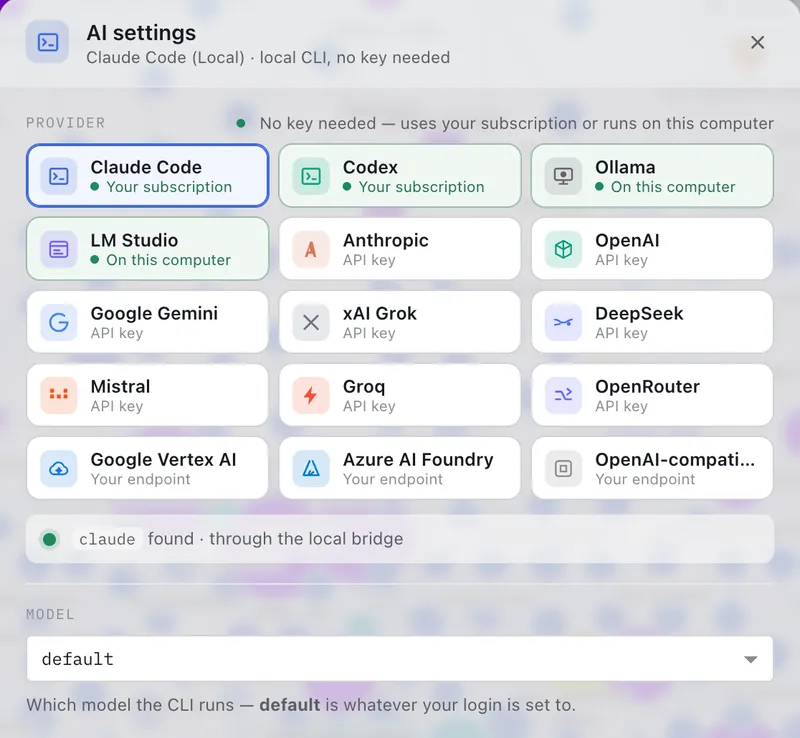
Settings › AI change it any time — the same choice, in the app - 2
Install Claude Code (or Codex)
One click runs the vendor’s official installer for your system — about a minute, no admin password. With an API key there is nothing to install.
- 3
Sign in
A small window opens your browser; you sign in on the vendor’s own page and Setup notices by itself. Studio never sees your password. With an API key, paste the key — it stays on this computer.
- 4
Install Second Brain
One button adds the brain builder and the agents to the standard folders your AI reads — Studio uses the same install. Python comes with the app.
- 5
Browser extension
optionalOnly for the agents’ browser steps (application forms, flight search, social steps): install Claude in Chrome, pin it, and sign in with the same Claude account.
- 6
Add your data
In Sources, add yourself (or your company), upload your exports and press Build. How to get each of the 27 exports
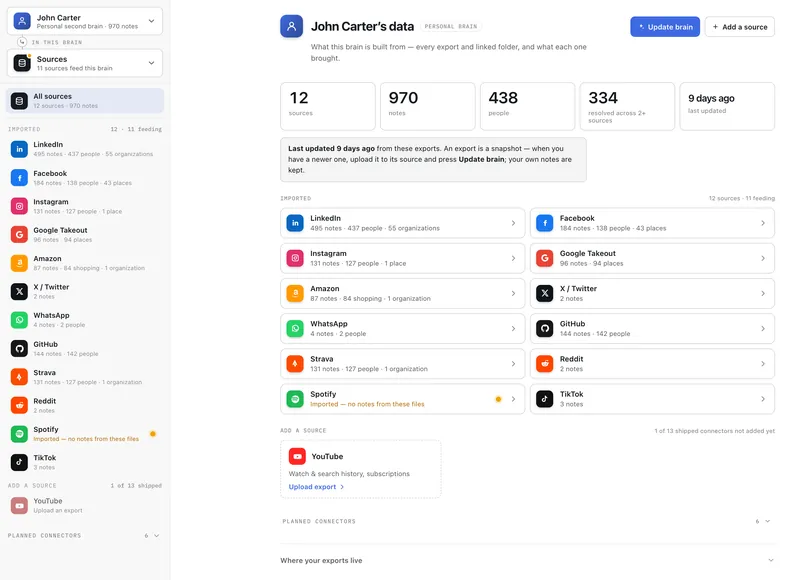
Sources every export feeding the brain, with its files — and the ones you can still add - 7
Talk to it & put it to work
Ask your brain anything in the chat. Open Agents in the left dropdown and start with “Set up my profile”. Setup stays one click away: Help ▸ Set Up Second Brain…, which also updates the agents.


Already use Claude Code or Codex?
Install with your AI.
Paste this into Claude Code, Codex or Claude Desktop. It follows the install guide for your computer and asks before each step.
Install Second Brain Link on this computer by following https://secondbrainlink.com/install.md
From a terminal
One line, for every AI tool it finds.
Installs the brain builder and the agents into the folders Claude Code and Codex read, each file checked against its published checksum. No git needed; building a brain from the terminal needs Python 3.8 or later.
curl -fsSL https://secondbrainlink.com/install.sh | sh
irm https://secondbrainlink.com/install.ps1 | iex
| Or download each file | Claude Code | Codex |
|---|---|---|
| Brain builderturns your exports into the brain | second-brain-link.skill | second-brain-link.skill |
| Jobs agentjob-search | job-search.zip | job-search.skill |
| Fundraising agentfundraising | fundraising.zip | fundraising.skill |
| Travel agenttravel-planner | travel-planner.zip | travel-planner.skill |
| Sales agentsales | sales.zip | sales.skill |
Each file is a zip with one folder: unzip it into ~/.claude/skills/ (Claude Code) or ~/.agents/skills/ (Codex). Versions and checksums: manifest.json. Developers: build from source.
If something doesn’t work
Setup tells you what is missing.
Open Help ▸ Set Up Second Brain…: every step shows its state, and Fix it for me hands the problem to your own AI with the install guide.
- “Claude Code not found” right after installing itQuit and reopen the app.
- “Not signed in”Click Sign in in Setup again and finish the login in your browser.
- An agent is missingAgents (left dropdown) ▸ the agent’s card ▸ Install.
- Browser steps say “not connected”The Chrome extension must be signed in with the same Claude account; then restart Chrome.
- Anything elsePer system: the full install guide.
Second Brain Mobile · iPhone & Android
Or build one on your phone.
The native app builds a brain entirely on the phone — import your exports, explore the graph, talk to your brain. No account, no cloud.
Which AI answers on the phone? On a recent iPhone, Apple Intelligence on the device — no key, nothing leaves the phone. On Android and older iPhones, your own key, kept in the phone’s keychain.


